


WDF*IDF
The WDF*IDF analysis is an important component for good texts and effective SEO. But how exactly does the formula work and what should be paid attention to? ... Continue readingWDF*IDF

Google Lens is a visual search engine from Google that lets you get real-time information on objects, text, plants, buildings, or products simply by using your smartphone camera. Instead of typing in a search term, you just point your camera at whatever interests you, and Google Lens delivers matching results right away. The app is available for free on Android and iOS, and it’s also firmly integrated into Google Search, Google Photos, and the Google Assistant.
In an increasingly digitalised world, visual content keeps growing in importance. Google Lens, an innovative tool developed by Google, sits right at the centre of this shift. This article takes a deep dive into the world of Google Lens, covering how it works, its many applications, and its benefits for consumers and businesses alike. Discover how this powerful tool is revolutionising the way we search for and recognise objects in our immediate surroundings, changing our everyday lives for good.

Google Lens is an artificial intelligence (AI) app from Google, which was launched in 2017 as a beta version for Google Pixel device users. Since 2018, there has been a standalone Google Lens app, which is also available for iOS and Android users.
The Google Lens app is available for free on the app stores. Google Lens is capable of understanding texts in different languages or recognizing objects, for example. If you as a user take a picture or a live recording, the tool is able to recognize this and provide you with further information.
Over the years, Google Lens’s range of features has been continuously expanded. The following use cases show just how versatile the app is in everyday life.
Google Lens offers a wide range of features that make it a versatile and useful tool in various everyday situations. Here are some of the key features that make Google Lens so special:
Google Lens uses advanced artificial intelligence (AI) technologies, particularly machine learning and computer vision, to power its impressive capabilities. When you point your camera at an object, a line of text, or a landscape, Google Lens captures the image and analyses it in real time. Several processes take place during this:
By using these technologies, Google Lens can act as your personal assistant, helping you understand and interact with the world around you. This makes it an incredibly powerful tool in your everyday life.
First of all, you’ll need the Google Lens app. If you already have it installed and have a photo in your library that you’d like more information about, simply open your photo library and select the relevant image. You can then tap the Google Lens icon to look up information about that image.
The second option is to take a photo or a live shot directly within the Google Lens app. To do this, open the app and start the Google Assistant. Now point your camera at the object you’d like more information about. Once you’ve taken the shot, tap the relevant element on your screen (for text, you’ll need to select it by highlighting it). Next comes voice search. By tapping the microphone icon, you can now ask Google Lens your question, for example: “What building is this?” or “Who created this sculpture?” That’s it, you’ll now get all the information you asked for.
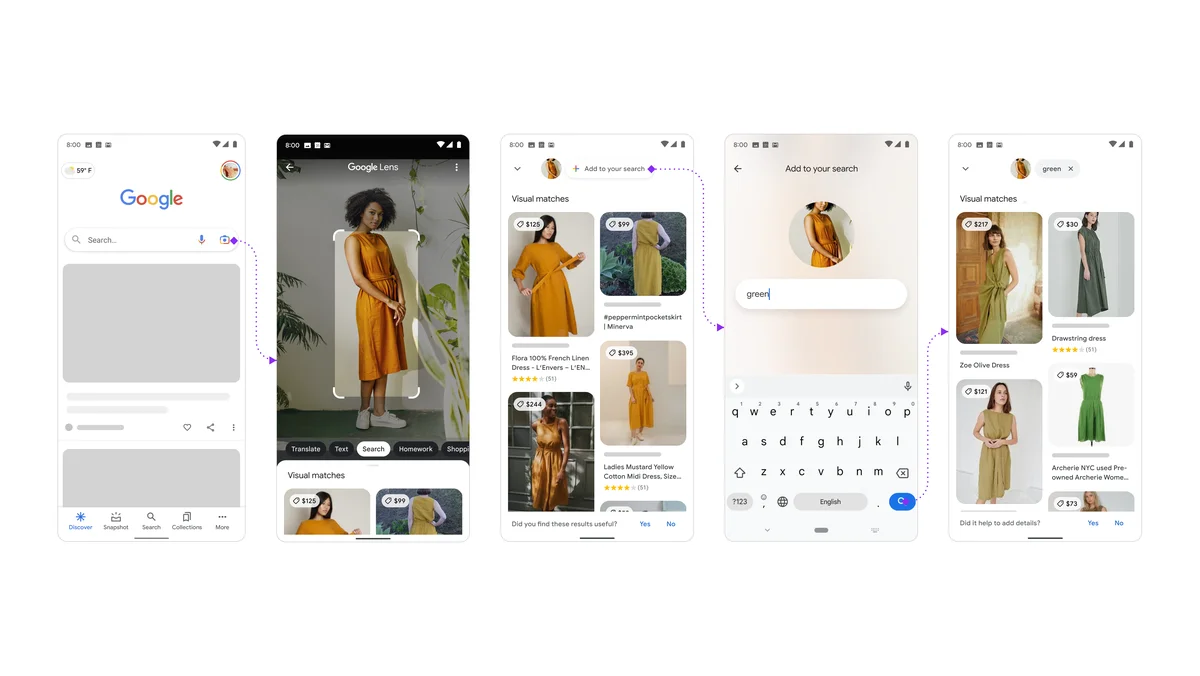
Google Lens has long since moved beyond pure image recognition. With the Multisearch feature, you can combine an image search with a text query. For example, if you photograph a piece of clothing and add the search term “in green,” Google shows you matching results in exactly that colour. This combination of visual and text-based search gives you noticeably more precise results than a pure image search could.
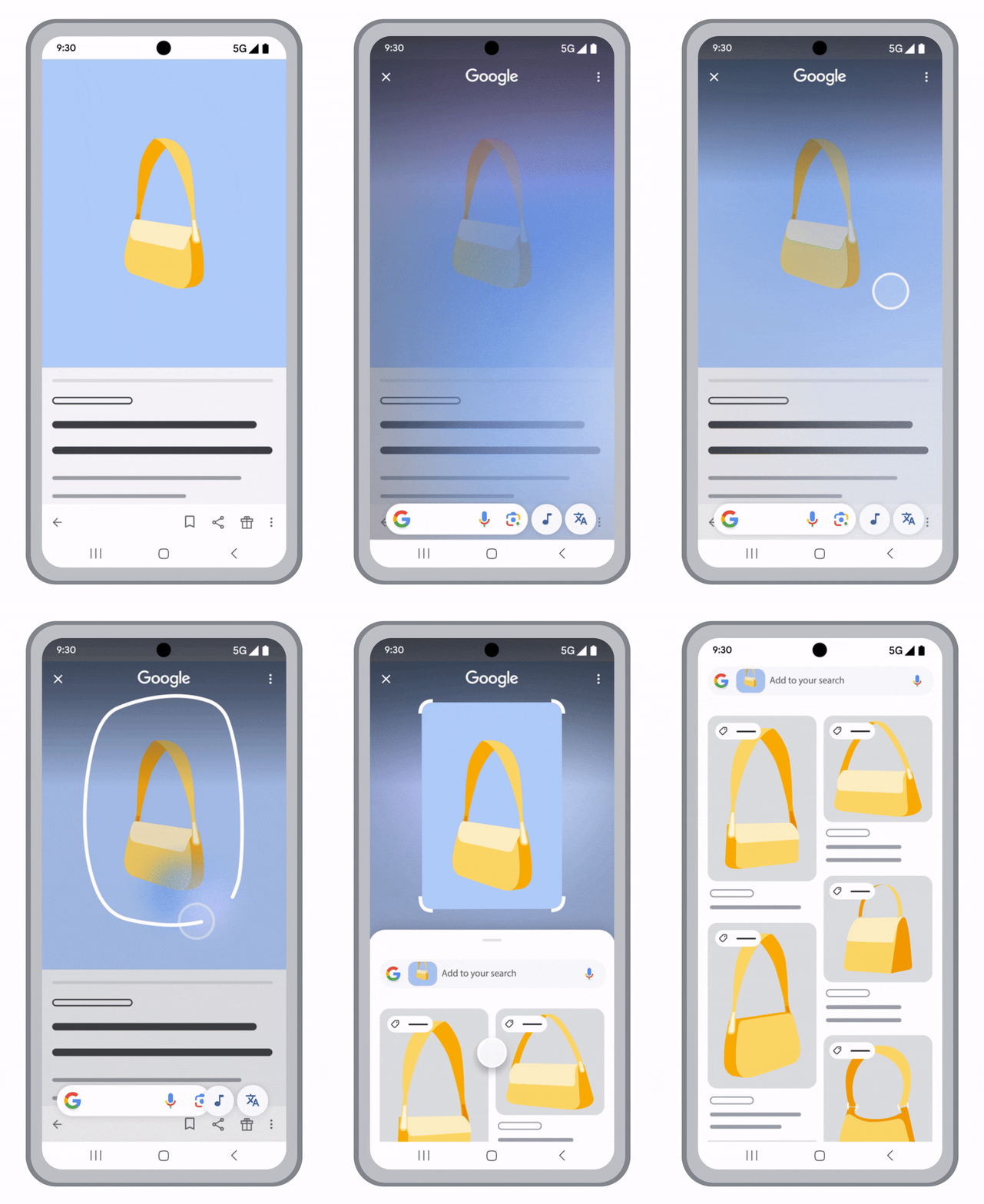
A further development of this is Circle to Search. With it, you can circle or tap an area directly on your screen, whether in an app, a video, or on a website, to instantly get more information about it. There’s no need to switch to a separate app anymore. Google Lens is also now firmly integrated into the Chrome browser on desktop. There, you simply highlight a section of an image on a webpage with your mouse and get matching results without ever leaving the tab.
For companies, this means that products and content must be visible and discoverable not only for traditional Google searches but increasingly for visual and combined search queries.
Data privacy is a central concern when using technologies like Google Lens. Since Google Lens has constant access to visual data through your smartphone’s camera, important questions arise regarding privacy and how this data is handled. Here are a few aspects you should keep in mind when it comes to Google Lens and data privacy:
How important is Google Lens for e-commerce?
Google Lens is steadily gaining importance in online retail, as users increasingly search for products using a photo instead of typing in text. To make sure your products can be found through Google Lens, three areas are particularly important.
As a pioneer in applying AI to visual search, Google Lens continues to stay at the forefront of innovative development. In recent years, Google Lens has evolved significantly through the integration of generative AI, considerably expanding what this tool can do.
Integration of generative AI: The latest breakthroughs in generative AI have enabled Google Lens to process complex information faster and more intuitively. This technology makes it possible to extract more comprehensive, context-aware information from visual data, significantly improving the user experience.
Multimodal capabilities: With the introduction of Gemini, Google’s most powerful AI model to date, Google Lens has started integrating multimodal capabilities. This means Google Lens can now seamlessly understand and combine different types of information, including text, audio, video, and code. This flexibility is especially useful in mobile applications and data-driven environments, delivering more varied and accurate answers.
Expanded applicability and accessibility: Google continues to integrate Google Lens into a broader range of products and services. This goes beyond smartphones and tablets, extending to other Google devices and platforms, further increasing how accessible and applicable Google Lens is in our everyday lives.
These developments show that Google Lens is no longer just a tool for image recognition, but is evolving into a comprehensive, intelligent assistant capable of communicating and interacting with us through visual, text, and even audio channels. The ongoing integration and improvement of AI technologies promise an even deeper, more seamless presence in our digital and physical world.
Google Lens is a free app and feature from Google that lets you use your camera to recognise objects, text, and places and get relevant information about them. The technology is based on artificial intelligence and image recognition.
Yes, Google Lens is completely free to use, both as a standalone app and as a built-in feature within Google Search, Google Photos, and the Google Assistant.
You’ll find Google Lens directly in the Google app as a camera icon in the search bar, in Google Photos when you open an image, or as a standalone app in the Play Store or App Store. On some Android devices, Google Lens is also built directly into the camera app.
Google Lens can recognise plants, animals, buildings, landmarks, works of art, books, barcodes, business cards, clothing, and household items, among other things. The app can also read text out and translate it in real time.
Olga Fedukov completed her studies in Media Management at the University of Applied Sciences Würzburg. In eology's marketing team, she is responsible for the comprehensive promotion of the agency across various channels. Furthermore, she takes charge of planning and coordinating the content section on the website as well as eology's webinars.
The WDF*IDF analysis is an important component for good texts and effective SEO. But how exactly does the formula work and what should be paid attention to? ... Continue readingWDF*IDF
The AIDA model shows you the four phases of the sales process and gives you insights into the advertising impact of your measures. The model has existed for over 100 years and has become very established in marketing and PR over time. Learn more about it here! ... Continue readingAIDA model
Coverage can be defined as the number of people reached with an advertising message or through a particular medium. It can be expressed both as a percentage (%) and by an absolute value. Various criteria must be defined to determine coverage accurately: the medium, of course, but also the target group and the time period in which coverage is measured. For more information click here. ... Continue readingCoverage
You want to learn more about exciting topics?
You are currently viewing a placeholder content from Hubspot Embedded Content. To access the actual content, click the button below. Please note that doing so will share data with third-party providers.
More InformationYou are currently viewing a placeholder content from HubSpot. To access the actual content, click the button below. Please note that doing so will share data with third-party providers.
You are currently viewing a placeholder content from Hubspot Meetings. To access the actual content, click the button below. Please note that doing so will share data with third-party providers.
More Information


