


Internal Link
Internal links can improve the link power of your page. This makes you look trustworthy for Google. How to use internal links correctly, you can learn here! ... Continue readingInternal Link

Google Scholar is a search engine of the US search engine company Google, with which you can search for academic papers and other scientific publications. Google Scholar is available worldwide and very easy to use. When you start a search on Google Scholar, the following documents are checked for your search query:
A small example: You enter “Google Scholar” into the search bar and get a list with all relevant results. You can even choose in advance whether you want to see documents in any language or only German-language documents. Then you can click on the results of your search and you will be shown the title, abstract, keywords, publication date, authors and publishers.
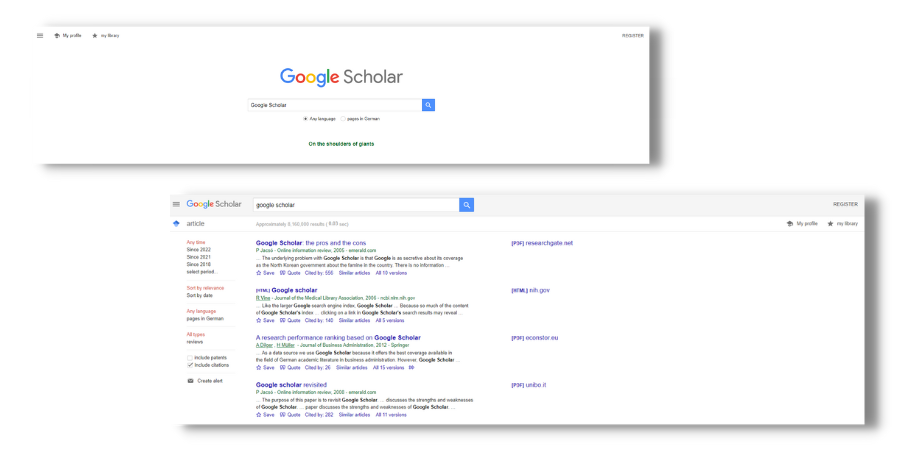
Google Scholar provides a comprehensive overview of all the scientific literature available online. Users can filter their search results by subject, publication date, language, document type and many other criteria. In addition, Google Scholar enables the export of citation information. In addition, the full-text version is complemented by access not only to data from Google Books, but also to data from other sources.
Google Scholar describes itself as a service for searching scientific literature. It includes:
Because of its wide availability, Google Scholar is especially useful for scientists, university lecturers, researchers, undergraduate students, graduate students, research assistants, and even high school students.
If you use Google Scholar, you can benefit from many advantages. First, the search engine gives you access to a wide range of scientific articles and publications from different disciplines. This means that you can quickly and easily find relevant sources for your research. Another advantage is that Google Scholar has a comprehensive search function that allows you to search for specific keywords or authors. This saves you time and helps you find the information you need faster.
However, there are also some disadvantages to using Google Scholar. For one, it can be difficult to distinguish between reputable and non-reputable sources. It is important that you always look critically at the results you find and check them for their credibility. Another disadvantage is that not all scientific publications are included in Google Scholar. So it can happen that you miss important information or cannot find it.
Google Scholar is a search engine for scientific articles. It allows you, the user, to find scholarly articles from all over the Internet based on keywords. The results include links to full-text articles and abstracts. This tool is useful when searching for research articles, especially those published in journals. At many universities and (technical) colleges, Google Scholar is recognized for research on papers. For all users who are interested in scientific articles, Google Scholar is a time-saving and convenient alternative to get the desired information. Depending on the type of research, Google Scholar can save you a trip or two to the library.
If you are currently writing a paper, check with your professor whether sources that you have found and indicated via Google Scholar are recognized for your work! 😊
Internal links can improve the link power of your page. This makes you look trustworthy for Google. How to use internal links correctly, you can learn here! ... Continue readingInternal Link
Retargeting allows you to target ads to people who have already shown interest in your products. Learn more here 🙂 ... Continue readingRetargeting
URL definition Most internet users have certainly come across the term at some point. But what exactly is a URL? The abbreviation URL stands for “Uniform Resource Locator”. A URL is used to call up web pages and is often also referred to as an internet address or URL address. It tells the browser which ... Continue readingURL (Uniform Ressource Locator)
You want to learn more about exciting topics?
You are currently viewing a placeholder content from Hubspot Embedded Content. To access the actual content, click the button below. Please note that doing so will share data with third-party providers.
More InformationYou are currently viewing a placeholder content from HubSpot. To access the actual content, click the button below. Please note that doing so will share data with third-party providers.
You are currently viewing a placeholder content from Hubspot Meetings. To access the actual content, click the button below. Please note that doing so will share data with third-party providers.
More Information


