


Retargeting
Retargeting allows you to target ads to people who have already shown interest in your products. Learn more here 🙂 ... Continue readingRetargeting

The alt attribute (also known as alt tag or alternative text) is an HTML attribute that describes the content of an image in text form. It is used in the source code of an HTML document within the <img> tag to tell Googlebot and other search engines what is depicted in an image. This alternative text is not visible to visitors, but is displayed when an image cannot be loaded or is read aloud by screen readers to make the content accessible to people with visual impairments.
The word “alt” stands for “alternative,” meaning an alternative description of the image content. The term “attribute” comes from HTML syntax and refers to an additional property of an element. The term “alt tag” is also used colloquially, although technically it is not a tag but an attribute of the <img> element. The alt attribute plays a central role in search engine optimization (SEO) because it helps Google index images correctly, thus contributing to the image search and accessibility of a website.
The primary purpose of the attribute is to describe the image. The text stored in the alt tag can be displayed as an alternative to the graphic. If an image does not load automatically or does not work for a user, the text stored in the alt tag will also be displayed. Alt tags can also be used if there are server problems and graphics cannot be loaded completely or at all. Alt tags also serve to improve the accessibility of a website.
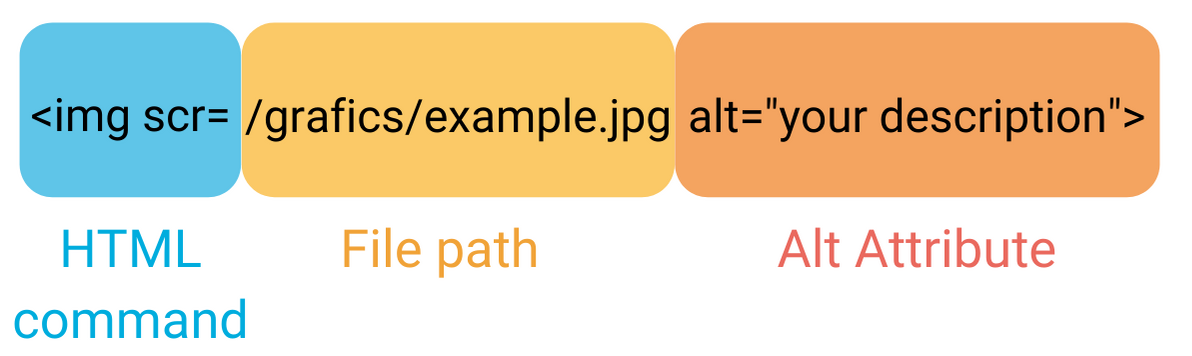
The Alt attribute is stored in the HTML source code of your website. It is located in the image tags. At the beginning of the tag is “img scr”. This is the HTML command to access a defined location. This is followed by “/grafics/example.jpg”. This is the link to the folder where the graphic is stored. Then follows the alt attribute with “alt=your description”.
This attribute also plays an important role in terms of accessible website design. Screen readers, which are often used by blind users, cannot interpret image data. Instead of the graphic, the stored text is read aloud. This allows users with disabilities to not only understand the text on your website, but also the image elements.
In on-page optimization, the alt attribute is an important parameter for a good ranking, as the alt tag describes what can be seen in the image for Googlebot. Search engine bots are now very sophisticated data collectors. Accordingly, they can mostly read text found when crawling your website.
The alt tag helps search engines like Google understand the content of an image and index it correctly. This improves visibility in image searches and strengthens the thematic relevance of a page. At the same time, the alt attribute enables accessible surfing: screen readers read the alternative text aloud so that visually impaired people can also understand the visual content. Correctly used alt text therefore improves both SEO performance and user experience.
As a guide for the correct length, W3C gives a guideline of 75 to 100 characters. W3C is the abbreviation for the World Wide Web Consortium. The goal of this consortium is to standardize protocols and guidelines for the WWW. Techniques such as HTML, CSS and XML are the best known examples.
It is therefore very difficult to give a concrete guideline. However, you should keep in mind that your description of the alt tag should be as short as possible and as long as necessary. Write your text as natural as possible to avoid keyword stuffing in your source code. Usually you intuitively include one or two of your keywords in the text. This gives the search engines similar to keyword-optimized texts already suitable clues and can result in better rankings in the Google image search.
Good alt text describes precisely what can be seen in the image—factual, brief, and relevant. Avoid filler words or keyword stuffing. State the core content of the image, e.g., “Woman working on laptop in office” instead of “Image of a woman.” The text should reflect the purpose of the image and offer added value if the image cannot be loaded. Important: Use natural language, not a list of search terms.
Among the most common mistakes are missing or generic alt texts such as “Image123” or “Logo.” Excessive use of keywords (“SEO Alt Tag Marketing Search Engine Optimization”) is also viewed negatively by Google. Avoid redundant terms such as “image of” or “graphic shows.” Equally problematic are empty alt attributes when the image contains relevant information. Every alt text should be unique and meaningful.
Kathas heart has been beating for marketing since her training as a marketing communications specialist. As part of the eology marketing team, she takes care of the agency's trade fair and event management. Katha also enjoys sharing her accumulated eology knowledge in magazines, blogs and journals.
Retargeting allows you to target ads to people who have already shown interest in your products. Learn more here 🙂 ... Continue readingRetargeting
Bid Management allows you to automatically manage digital marketing campaigns. Find out how it works here! ... Continue readingBid Management
Google Shopping is an effective way to present your products in an appealing way in Google Search, in order to reach customers in the best possible way. ... Continue readingGoogle Shopping
You want to learn more about exciting topics?
You are currently viewing a placeholder content from Hubspot Embedded Content. To access the actual content, click the button below. Please note that doing so will share data with third-party providers.
More InformationYou are currently viewing a placeholder content from HubSpot. To access the actual content, click the button below. Please note that doing so will share data with third-party providers.
You are currently viewing a placeholder content from Hubspot Meetings. To access the actual content, click the button below. Please note that doing so will share data with third-party providers.
More Information


