

Cloaking
Cloaking is a technique in which a website provides different content for search engines and human visitors. Learn more about it. ... Continue readingCloaking

Tabindex is an HTML attribute that lets you control whether and in which order the elements of a website can be reached with the Tab key. For everyone who browses without a mouse, it determines whether a page is easy to use. Here you’ll learn what the values -1, 0 and 1 (or other positive numbers) mean, how to use tabindex correctly and which mistakes you should avoid.
Tabindex (also known as the tabindex attribute) is a global attribute in HTML. Global means: you can basically assign it to any element. Its value is an integer, which determines
Some elements are focusable by default, such as links with href, button, input, select, textarea or an iFrame. They don’t need a tabindex. Without the attribute, the focus moves through these elements in the order in which they appear in the source code.
This is what tabindex looks like in HTML:
<div role=”button” tabindex=”0″>Show more</div>
<p id=”error” tabindex=”-1″>Please enter a valid email address.</p>
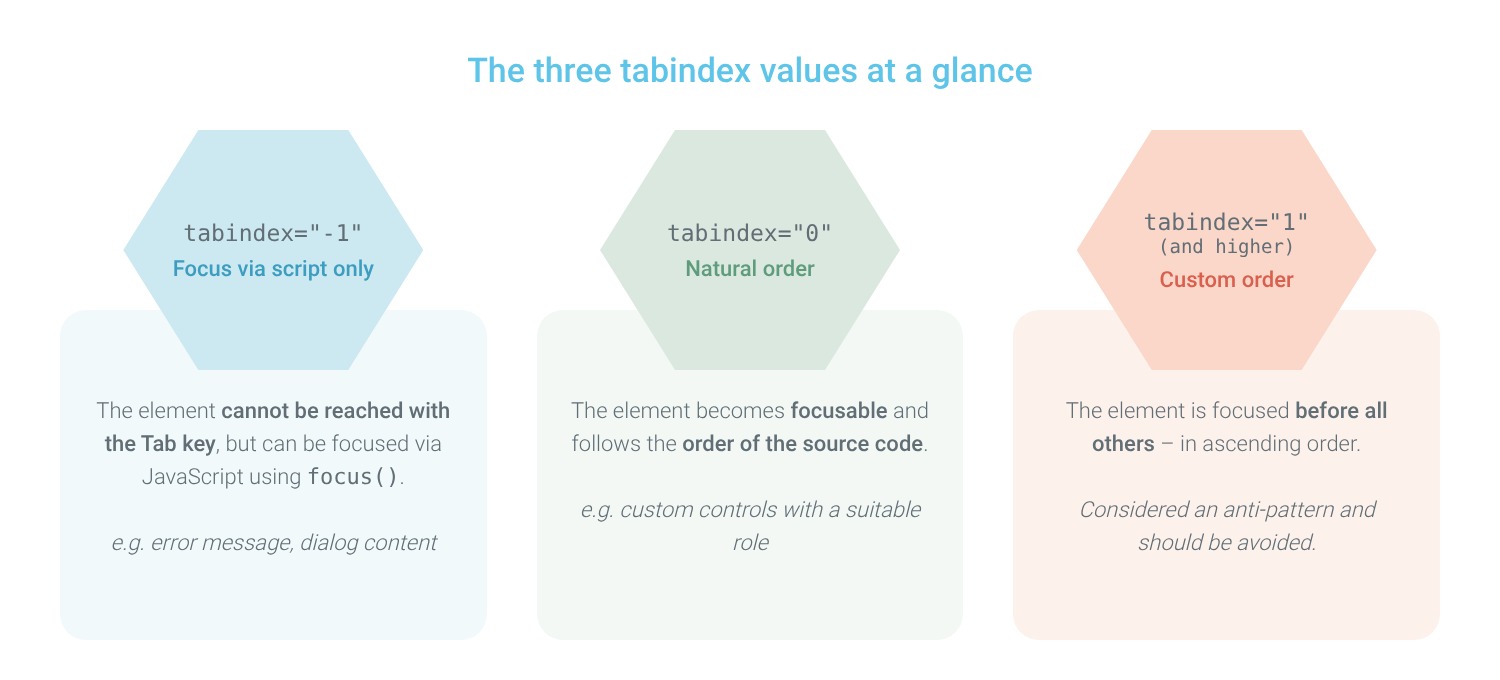
What matters is whether the value is negative, zero or positive.
With tabindex=”-1″, an element cannot be reached with the Tab key, but it can be focused directly via JavaScript. You can use this, for example, for an error message after a form has been submitted or for the content of a dialog that has just opened. If you set the value on a button, it disappears from the tab order. Its child elements, however, remain reachable.
With tabindex=”0″, you make an element focusable that normally isn’t. It takes its place in the tab order according to its position in the source code. A typical use case is custom controls that are not based on a native element.
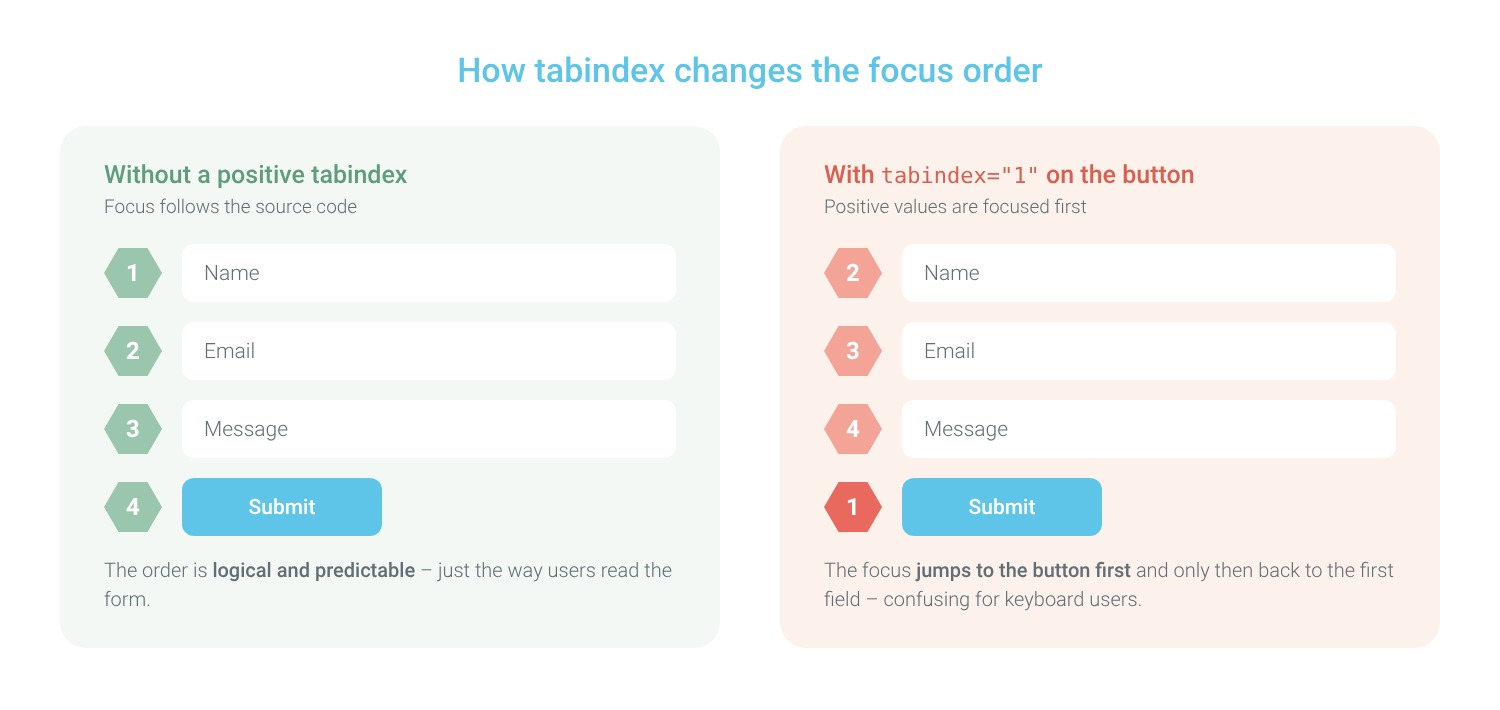
Positive values such as tabindex=”1″ or tabindex=”2″ are focused before all other elements, in ascending order. Only then do elements with the value 0 and natively focusable elements follow. What sounds practical at first quickly leads to chaos. That’s why Google calls positive values an anti-pattern. According to MDN, the maximum permitted value is 32767.
Many people use websites with the keyboard only, for example due to motor impairments or because they use a screen reader. For them, the tab order is the path through your page. The Web Content Accessibility Guidelines (WCAG) therefore require that all functions can be operated with the keyboard and that the focus order is logical.
In Germany, the Accessibility Strengthening Act (BFSG) has also required many providers of digital products and services to make their offerings accessible since June 2025. A clean tab order also improves the user experience for all visitors. Tabindex is not a direct ranking factor. However, Google’s Lighthouse tool checks in its accessibility audit whether any elements have a tabindex greater than 0.
What is the difference between tabindex -1 and 0?
Both values make an element focusable. With 0, it can also be reached with the Tab key as usual, whereas with -1 it can only be focused via script.
Can you set tabindex in CSS?
No. Tabindex is a pure HTML attribute. With CSS, you only style how the focus looks visually, for example with :focus-visible.
How do I set tabindex with JavaScript, React or Angular?
Why is my tabindex not working?
Common causes are hidden elements (display: none or visibility: hidden), disabled form fields (disabled), an invalid value (such as an empty string) or positive values somewhere else entirely that mix up the order of the whole page.
Should you set tabindex on every element?
No. Many testing tools explicitly point this out as well: tabindex belongs exclusively on interactive elements. Plain text paragraphs with tabindex=”0″ make the path through the page unnecessarily long for keyboard users.
Tabindex controls how users navigate your website with the keyboard. With -1, you make elements focusable via script, and with 0, you add custom controls to the tab order. You should avoid positive values. Structure your source code logically and rely on native HTML elements. This keeps your website accessible and easy to use. You can find more tips for user-friendly websites in our article on usability.isch auf und setze auf native HTML-Elemente. So bleibt Deine Seite barrierefrei und angenehm zu bedienen. Weitere Tipps für nutzerfreundliche Websites findest Du in unserem Beitrag zur Usability.
Cloaking is a technique in which a website provides different content for search engines and human visitors. Learn more about it. ... Continue readingCloaking
Google Suggest is the service for completing questions and texts from Google. How you can use this effectively, you will learn here! ... Continue readingGoogle Suggest
From voice assistants to autonomous driving—machine learning is behind many innovations. Learn the basics, algorithms, and fields of application. ... Continue readingMachine Learning
Want to learn more about exciting topics in the industry?
You are currently viewing a placeholder content from Hubspot Embedded Content. To access the actual content, click the button below. Please note that doing so will share data with third-party providers.
More InformationYou are currently viewing a placeholder content from HubSpot. To access the actual content, click the button below. Please note that doing so will share data with third-party providers.
You are currently viewing a placeholder content from Hubspot Meetings. To access the actual content, click the button below. Please note that doing so will share data with third-party providers.
More Information


