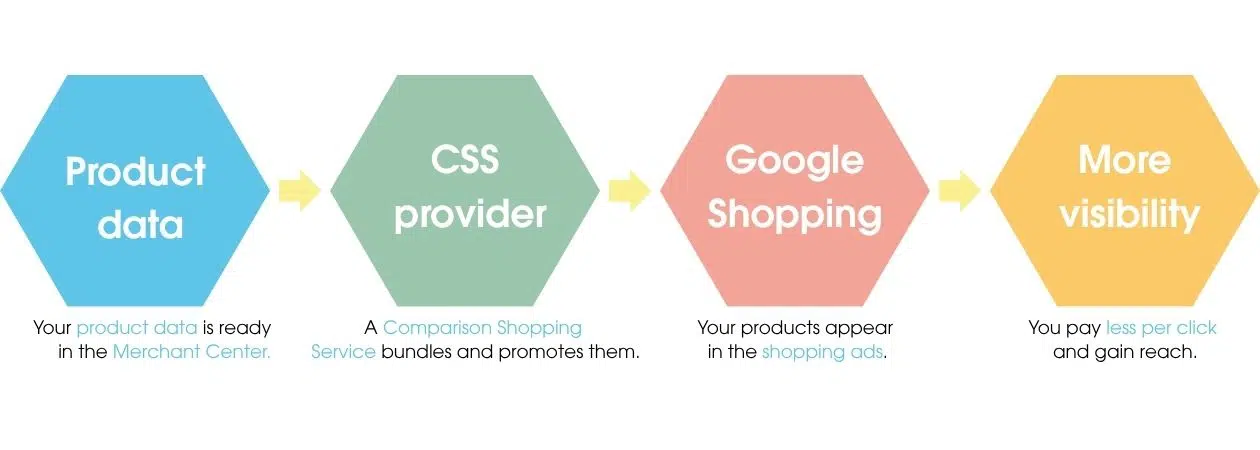
Google CSS stands for Comparison Shopping Service. Behind it lies a clever way to feature your products on Google Shopping while even saving costs. In this article, you’ll learn what Google CSS actually is, how the partner program works, which providers exist, and how you can benefit from it yourself.
What is Google CSS?
A Comparison Shopping Service (CSS) is a platform through which products are listed, promoted, and ultimately displayed in Google Shopping ads. These comparison shopping services bundle offers from different online retailers and let users quickly and transparently compare prices and conditions directly in the search results.
What many don’t know: Google Shopping is itself a CSS and competes with external comparison shopping portals, known as CSS partners, for the coveted ad placements in Google search. As a retailer, you therefore have the choice of running your shopping ads through Google itself or through an external CSS provider.
Google CSS explained simply. Source: eology
How did the Google CSS partner program come about?
Today’s partner program is the result of a decision by the European Commission. In 2017, the EU imposed a record fine of around €2.42 billion on Google because the company had favored its own comparison shopping service over other providers, thereby distorting competition.
As a consequence, Google had to open Google Shopping to external CSS partners. Since then, online retailers have been free to choose which service they use to feature their products in the shopping results, a decisive step toward more fairness and diversity in the ads.
How does Google CSS work?
A CSS partner technically connects your online shop with Google Shopping and takes over the key tasks around your campaigns. Instead of running your ads through Google’s standard CSS, they’re booked through the partner’s platform. Typical services include:
Data preparation & feed maintenance: product data such as price, availability, and brand are correctly prepared and regularly updated via the Google Merchant Center.
Campaign set-up: building a clean campaign structure aligned with your goals.
Bid & budget management: strategies based on margin, target ROAS, and the competitive landscape.
Monitoring & reporting:impressions, clicks, and conversions are continuously tracked and transparently documented.
Ongoing optimization: fine-tuning bids and ads based on performance data.
What are the benefits of Google CSS?
The most well-known advantage is cost savings. External CSS partners don’t pay Google a surcharge, which means you can get up to 20% more out of your click price (CPC). Beyond that, you also benefit from:
Higher visibility: your products appear at more touchpoints in Google Shopping.
More revenue: more reach generally means more clicks and sales.
Faster scaling: you can target individual product segments without changing your internal set-up.
Full control: your own campaigns remain untouched, the partner operates independently on their platform.
Essentially, there are two options to choose from. On one hand, Google Shopping itself, which is set as the default CSS. On the other hand, a growing number of external CSS providers that specialize in delivering shopping ads, ranging from pure technology providers to full-service agencies.
When choosing, you should pay particular attention to the billing model (fixed fee, percentage-based, or performance-based), the depth of support, and transparency. Some providers work purely on a performance basis, so you only pay when an actual sale happens.
We at eology are also one of these providers and operate our own proprietary CSS, through which we feature your products in Shopping Ads. Having your own CSS is arguably the biggest lever in comparison shopping, as it typically generates more interactions and clicks than a classic third-party provider.
Through our CSS, you get up to 25% more out of your click price (CPC), because the Google surcharge is eliminated. There’s also an often underestimated benefit: the “by CSS” link in your ads generates additional, free traffic to the CSS page. This way, you combine lower costs with maximum visibility in Google Shopping, with no extra effort on your part.
A quick calculation example:
If your click price through Google’s standard CSS is €0.50, it drops by up to 25% to around €0.38 through an external CSS. With 10,000 clicks per month, that saves you over €1,200, budget you can invest directly into more reach and revenue.
How do you become a Google CSS partner?
Anyone who wants to participate in the program as a comparison shopping portal themselves must meet certain minimum requirements and guidelines from Google. The key points at a glance:
Location: registration in a supported country, including a stated business address on the website.
Merchant diversity: products from at least 50 different merchant domains per country.
Search & filter function: a search field as well as sorting and filtering options by price and at least one other relevant dimension.
Product data quality: compliance with Google’s product data specification, along with correct spelling, grammar, and high-quality images.
If these criteria are met, the portal can apply via the Google CSS Center and, after successful review, operate as an official partner.
Is Google Shopping or Google CSS free?
Delivering your product feed via the Merchant Center is free, but you pay per click for the shopping ads themselves. So there’s no fixed fee for being “at the top” on Google, the price results from the auction principle and depends on competition, bid, and the quality of your data. This is exactly where Google CSS comes in: through an external partner, your effective click price drops because the Google surcharge is eliminated. From a purely performance marketing perspective, switching is therefore almost always worth it.
Challenges and solutions with Google CSS
As clear as the benefits are, there are a few pitfalls you should be aware of. For the most common challenges, there’s a simple solution for each:
Data quality: a faulty or outdated feed costs visibility. Solution: maintain your product data regularly in the Google Merchant Center and update it at least once a week.
Choosing a provider: intransparent models negate the cost advantage. Solution: look for performance-based, transparent billing with no hidden fees.
Fear of cannibalization: many worry that an external CSS would weaken their own campaigns. Solution: in reality, it complements them, you retain full control, and duplicate bids on the same product are excluded.
Conclusion
Google CSS is far more than a technical detail: it’s an efficient lever for running your shopping ads more cost-effectively while increasing your visibility at the same time. Anyone promoting products via Google Shopping should definitely tap into the potential of external CSS partners. With your own CSS like eology’s, you get the most out of it. Pay attention to a transparent billing model, well-maintained product data, and a clear search intent, that way, you turn your shopping channel into a genuine growth driver.
Pay per click, or PPC for short, is a billing method in online marketing. It is used primarily in paid advertising, where it is used to charge for advertisements according to the number of clicks. For this reason, PPC is sometimes also referred to as click compensation. The advantage for you as an advertiser is that you only have to pay when an actual action is taken by the user, namely clicking on the ad. It is a common payment method when budgeting for campaigns on Google, Facebook, Amazon and Co. ... Continue readingPPC (Pay per Click)
What is the CTR? The click-through rate (CTR) or click rate is an important metric that indicates how often an ad or link was clicked in relation to the number of impressions. It is crucial for the performance and success of advertising campaigns or search results. CTR in different marketing channels The CTR is a ... Continue readingCTR
From voice assistants to autonomous driving—machine learning is behind many innovations. Learn the basics, algorithms, and fields of application. ... Continue readingMachine Learning
You are currently viewing a placeholder content from Hubspot Embedded Content. To access the actual content, click the button below. Please note that doing so will share data with third-party providers.
You are currently viewing a placeholder content from HubSpot. To access the actual content, click the button below. Please note that doing so will share data with third-party providers.
You are currently viewing a placeholder content from Hubspot Meetings. To access the actual content, click the button below. Please note that doing so will share data with third-party providers.