Search engine optimization is an important area of online marketing. Many factors must be taken into account and a wide variety of data must be used in order to derive the right measures and strategies and evaluate their results. In order to be able to use and take all this data into account, SEO experts use tools that support them in their work. This article presents a selection from the endless tool landscape and assigns popular and useful functions to them.
These are applications used to analyze websites, identify opportunities and risks, and determine appropriate measures and strategies. The first challenge is finding the “right” tools and learning how to use them effectively. Another hurdle is interpreting the data obtained correctly.
Why are SEO tools important?
In online marketing, a lot of time is spent analyzing and processing data. The “better” a marketer’s SEO tools are, the less time is required and the more targeted the measures become. That’s why this article focuses on tools that, depending on the use case, can deliver the greatest impact and best data in our view.
A website check with SEO tools
Since there are countless possibilities and approaches for a website check/SEO audit, it is important to at least define the most important key points that must be considered in every case at the outset. Depending on the size of the website or the approved resources, these can be deepened or expanded.
Some tools provide excellent guidance here, as the structure of the reports already provides topic clusters and thus analysis approaches. However, even the best tool is not enough for holistic optimization if the recipient is not up to date with developments in the SEO industry, current Google updates, and a certain basic understanding of SEO basics and important terms. In addition, due to the increasing amount of data and possible data sources, a basic understanding of statistics and data analysis is also helpful. This article does not provide a complete list of tools that are equally helpful for everyone, but it does provide a good guide for most small to medium-sized websites.
SEO tools for analyzing website performance
First, we will look at tools that help evaluate the performance of a website or app. A fundamental question is: What does my site rank for (in organic search)? How are my top sellers performing? Where do my users come from? Etc.
In theory, you don’t need to use an expensive tool to answer these questions. All you need to do is take a look at the two tools that Google provides free of charge:
Google Analytics & Google Search Console
Every SEO or online marketing manager is probably familiar with Google Analytics and Search Console, the best-known tools that are freely available to every website operator. But what distinguishes the two tools, and what can each tool be used for?
Google Analytics
Google Analytics is an online marketing analysis platform from Google that collects data in the form of metrics and dimensions of varying scope. These can be viewed either in preset dashboards and reports or in user-defined segments.
Google Analytics can provide helpful information about all areas of a website, user behavior, or landing pages. By implementing “e-commerce tracking,” further insights into purchases on the website can be gained.
Unfortunately, due to the many possibilities offered by Google Analytics and the dashboards that are not automatically adapted to every website, laypeople often misinterpret the data.
However, if you deal with these topics and are proficient in using the various reports, filters, metrics, and dimensions, Google Analytics can be a great help to online marketers in monitoring websites and reporting to stakeholders.
Here is a look at the most common analyses in Google Analytics:
Measurements of individual goals (e.g., newsletter signups, purchases)
and much more.
Alternative tools to Google Analytics
Adobe Analytics
Matomo Analytics,
Openwebanalytics
Google Search Console
Another free Google tool is Google Search Console (referred to as GSC), which is often underestimated and only used superficially. However, it is one of the most powerful tools for SEO work. When you open GSC, you will initially see an overview of some of the reports, which can also be selected manually via the left-hand navigation bar.
The performance report
The most frequently used GSC report is the performance report. Here, you can query how many impressions and clicks were generated for a URL or keyword within a defined period (maximum 16 months). The CTR and average position are also displayed.
However, as is often the case, the available data is more meaningful when comparative data is available. The question often arises: has performance declined? How did we perform in this area last year? The comparison function in the performance report is ideal for this purpose.
Other important applications/reports:
Information on page indexing
Remove pages
Mobile user-friendliness
Snippet optimization: Information on structured data
Security and Google penalties
Crawling statistics in the settings menu
GSC data limits
The performance report only provides limited data visibility. Even when exporting the URLs in question to Excel or CSV, Google only provides 1,000 rows. In the Search Central documentation, Google specifies a daily limit for data rows via the Search Analytics API and the Looker Studio connector.of 50,000 rows per day for every
Tag
Website
Search type
For most website operators, and especially smaller domains, this is often sufficient.
Data analysis at Bing
A comparable counterpart to Search Console for Microsoft’s Bing search engine is Bing Webmaster Tools.
On-page and off-page analyses, visibility analysis, and benchmarking
To get an idea of a domain’s visibility compared to the competition, it is no longer enough to just use Google tools. Tools from Sistrix, Xovi, Ahrefs, Searchmetrics, or SEMRush can help here. They make it possible to identify competitors’ strengths and weaknesses, perform on-page and off-page analyses, and monitor your own rankings.
The Sistrix Toolbox
One of the best-known tools is probably the Sistrix Tool Box, often referred to simply as Sistrix. The most important and central metric of the tool is the visibility index. The higher the index value of a page, the better its visibility in Google search. This allows, for example, an initial competitive comparison to be carried out using the visibility index.
Sistrix also provides data for:
Keyword research & (gap) analysis
Ranking monitoring/ranking distribution
Technical analysis
Content analysis for quality and relevance
Backlink analysis
Monitoring of websites and keywords
Creation of automated and custom reports
Xovi
Xovi is a slightly cheaper alternative to Sistrix and works with a data set of 25 million keywords for Google.de. For this reason, XOVI describes itself as the world’s largest Google.de keyword set. The XOVI visibility index is called OVI, which stands for Online Value Index, i.e., the visibility of the domain in the organic search results of Google and Bing. The principle is the same as with Sistrix: the higher the visibility, the more or better rankings a website has.
XOVI enables users to:
Monitor, manage, and group keyword rankings
Keyword monitoring of defined keywords
On-page analysis for technical optimizations, text optimizations, and PageSpeed optimizations
Customized reports
Backlink toxicity analysis
Ads analysis of competitors
SE Ranking
SE Ranking is a comprehensive SEO tool with numerous features for SEO and GEO analysis. The platform enables rank tracking for mobile devices and desktops, competitor and backlink analysis, as well as on-page and website audits. AI search results such as AI Overviews or answers in ChatGPT, Gemini, and other AI systems can also be monitored with SE Ranking. This reveals which websites are mentioned, cited, or linked to.
Image 1: Overview SE Ranking
SE Ranking also offers:
Keyword research and gap analysis
Content optimization based on top-ranking content in SERPs
Agency package with white label reports
API connection
Local SEO with a map rank tracker
Ahrefs
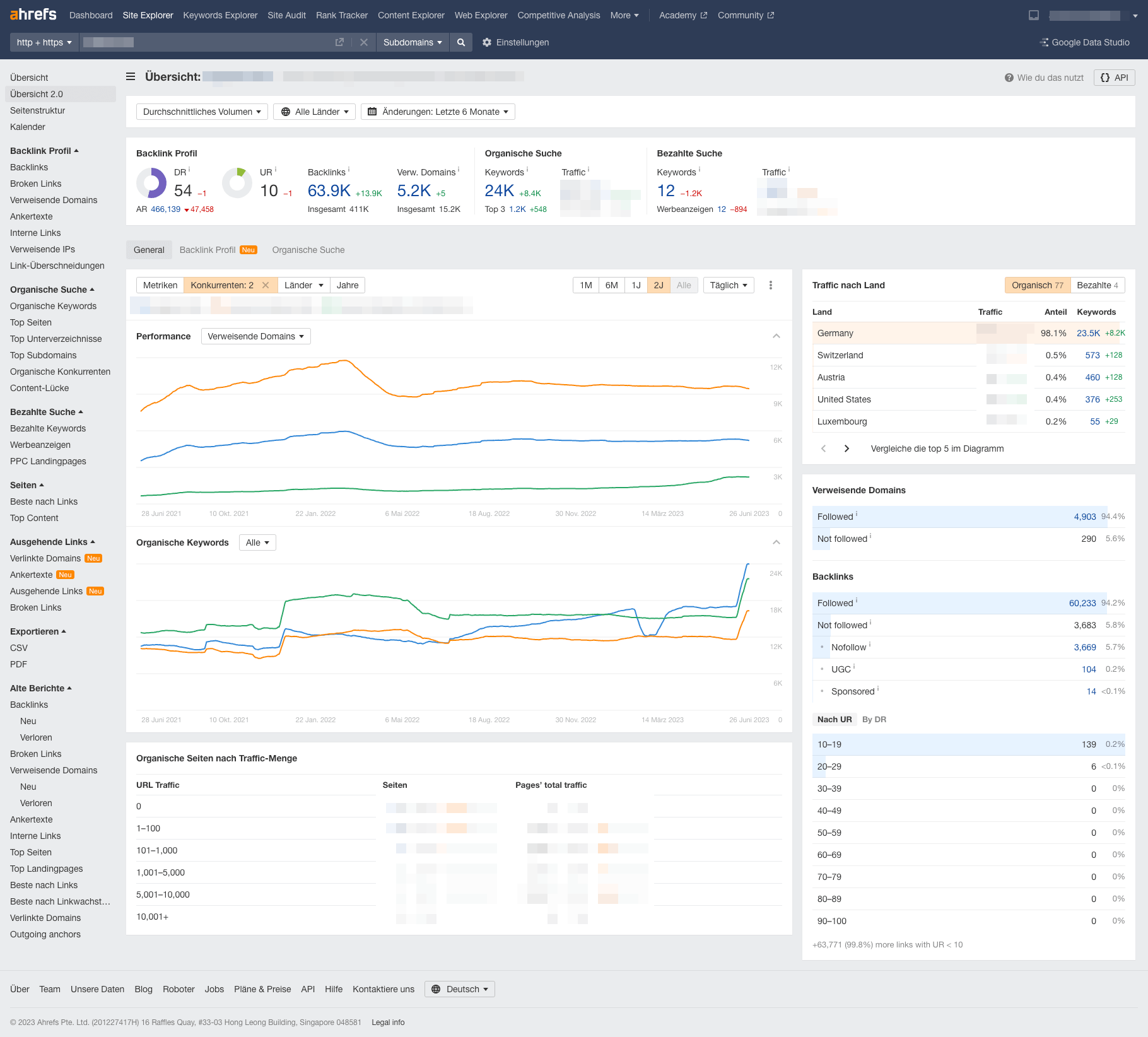
Ahrefs is best known for its excellent backlink analysis. Ahrefs analyzes, for example, how many different domains/pages link to a URL or website and what domain rating (quality factor at Ahrefs) they have. Most reports are self-explanatory. With little effort, you can obtain information on up to six competitors per analysis.
Image 2: Overview ober Ahrefs
Ahrefs also offers many other features:
SEO dashboard for created
Analyze backlinks and competitor rankings
Identify keyword ideas
Perform a site audit
Rank Tracker for desktop and mobile
Notifications for ranking changes or backlink gains/losses
Linkresearchtools
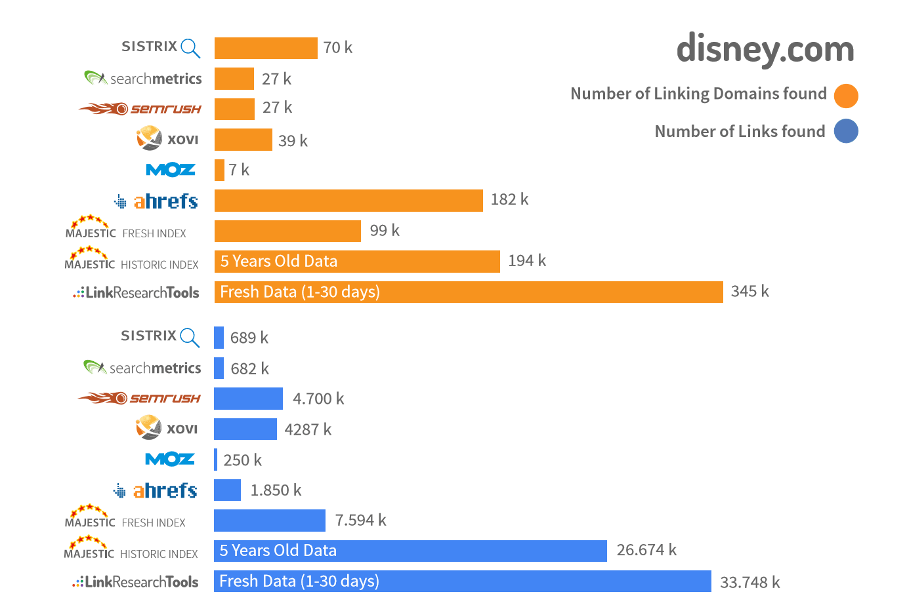
Linkresearchtools, which has been on the market since 2009, is a particularly powerful tool for off-page optimization. It focuses exclusively on (external) links.
The tool uses over 25 data sources, allowing it to display a website’s complete backlink profile. This is particularly clear in the following diagram:
Image 3: Links found using the Link Research Tool
As a counterpart to Ahrefs Domain Rating (DR), LRT uses its own metric, LRT Power*Trust. LRT Power evaluates the strength of a website based on the number of links and helps to quickly determine the strongest page, domain, or top domain. LRT Trust, on the other hand, evaluates the quality of links by calculating the trust inherited from trustworthy sites. These values can be easily queried using free browser extensions (Chrome).
LRT offers a wide range of analysis options. These are divided into the following categories:
Link analysis
Link audit & recovery from penalties
Backlink monitoring
Competitor analysis
Quality checks
Link source research
When it comes to link analysis, the Backlink Profiler, for example, is (according to LRT) the most comprehensive backlink analysis tool on the market and can provide a detailed overview of a domain’s links. Alternative tools with high visibility:
Searchmetrics
SEMRush
Practical Off-page analysis
In practice, it is important to define a fixed procedure with fixed tools. For tasks such as backlink toxicity analysis, it is advisable to check the domain with several tools, combine the results, and then check the URLs rated as toxic first. If off-page analyses tend to involve classic comparisons with a competitor, it is highly recommended to use a reliable database with excellently prepared data, such as Ahrefs. This is especially true for comparing referring domains. If you want a quick analysis that takes as little time as possible, Sistrix offers an excellent overview of the off-page status quo of a domain. But if you want to really drill down and focus fully on off-page, then the LRT tool, i.e., Linkresearchtools, is the right choice. Different tasks or stakeholders have different requirements for tools. Every SEO team has to make the right choice for itself.
Technical SEO analysis
An SEO audit provides detailed information on domain-wide internal linking, the use of canonical tags, the directives used (=noindex tags), HTTP response headers, robots.txt instructions, pagination (= rel/prev tags), the status of titles, descriptions, headings, validation errors in structured data, and much more.
Of course, providers such as Sistrix & Co also offer an on-page crawler, but other tools have proven to be particularly reliable for crawling websites and have even established themselves as the market standard in some cases—such as Screaming Frog.
Only for very large websites or very powerful requirements are crawling tools such as Audisto, Lumar.io, OnCrawl, etc. used. However, these tools require in-depth SEO knowledge or an understanding of technical SEO in any case.
Screaming Frog
In some circles, Screaming Frog is considered the Swiss Army knife of SEOs. SEO beginners in particular should familiarize themselves with the tool at a relatively early stage and develop an understanding of the various reports, API links, and diagrams that the tool offers.
With Screaming Frog, you can either crawl a domain according to defined rules from a specific start URL or crawl a list of URLs in list mode.
Screaming Frog helps you gain an initial overview of existing errors on the domain, including a classification into warnings and errors, information on how the errors usually occur, and tips on how to fix them.
Always configure SEO spiders correctly
However, the most important thing for using Screaming Frog correctly is to configure the tool correctly, which can seem a little overwhelming when you open it for the very first time. The people behind the tool have done a great job and explain pretty much every point when you hover over it with the mouse.
Use API links
Even better than a crawl that provides information about technical errors is a crawl that is additionally enriched with performance data for the individual URLs or provides information about indexing on Google. For this, it is worth using the option of API links to Search Console, Analytics, or even the link to the GSC URL Inspection Tool.
Scheduled crawls with Screaming Frog
Another extremely useful feature of Screaming Frog is the ability to run automated crawls. Once set up, the configured crawl is performed at specified frequencies, at a fixed time, on a fixed day of the week. This allows you to conveniently track the development of technical errors and bug fixes on a domain.
PageSpeed Insights
Since 2011, Google has been offering an online tool that can be used to measure PageSpeed and Core Web Vitals. This is mainly because it now also uses the functionalities of Lighthouse, which has been available in the developer tools of the Google Chrome browser since April 2018. Page Speed Insights (PSI) not only provides a simple value and color scale, but also details the errors found and explains what should be done. It thus provides great assistance for SEOs who then need to approach technical developers or want to address one or more of the problems mentioned themselves for the first time. At the beginning of the analysis, you receive information about the Core Web Vitals and, directly below that, an overview with a so-called performance factor. Here, the Core Web Vitals values are listed again and performance ratings are given for the areas of accessibility, best practices, and SEO.
Data quality: field data and lab data
However, there are problems with evaluating all pages, as sufficient data must be available to calculate these values. This means that a page needs significant traffic for a calculation of real “field data” (anonymized, genuine). But some websites simply do not (yet) have this traffic.
This is where lab data comes into play. Although all Core Web Vitals are primarily field metrics, many of them can also be measured in the lab.
Other tools that work with lab data and evaluate a page’s performance include Chrome Developer Tools and Lighthouse.
What are the best SEO-tools?
As you can easily see, there is no such thing as the “best SEO tools”; each tool has its strengths and weaknesses. Depending on the company or website, you should consider which tool portfolio makes the most sense in the SEO process. Of course, it is not possible to cover the entire range of tools on the market in just one article, but we have listed what we consider to be the most important tools for classic SEO work and highlighted their advantages. Due to the scope of this article, special tools for keyword research have not been included here.
You can find detailed instructions for your keyword research here!
Sebastian graduated with a Bachelor of Science in E-Commerce from the University of Applied Sciences in Würzburg. As a member of the SEO team, he supports customers in building their visibility and optimising their traffic, both as an independent project manager and as a reinforcement in other teams. He is also the internal contact person for KNIME, which can be used to automate classic Excel applications.
QR codes are enjoying great popularity. From immediate forwarding to detailed product information and simple payment processing to retrieving WiFi access data: QR codes are now ubiquitous. But QR codes are more than just information carriers - they are also an effective marketing tool. You can find out everything you need to know about QR code marketing in this magazine article. ... Continue readingWhat you should know about QR code marketing
Snippets are the preview of your website in the SERPs. They attract attention and lure users to your site. To stand out in the multitude of snippets, you need the perfect one! How to do that and what you should know, you will learn here. ... Continue readingSnippets and Snippet Generators – How to optimize correctly!
YouTube marketing is a great way to attract more customers - but only if you do it right! Whether for product information or company presentations - with YouTube marketing you can score points all along the line. We explain to you how it works! ... Continue readingHow to use YouTube marketing wisely
15 min
Want to learn about our favorite SEO tools at eos? 🤔