


Seeding
Seeding is a core component of modern online marketing and is used by many (mostly unconsciously). Here we explain exactly what seeding is and how it affects your own marketing. ... Continue readingSeeding

Carousel Ads (also known as Carousel Advertising) are among the most versatile ad formats in social media marketing. Instead of a single static image, a Carousel Ad displays multiple images or videos in a single, swipeable ad block – each card with its own headline, description, and even its own link. It is precisely this combination of storytelling and interactivity that makes the format so popular with brands, online stores, and B2B companies.
In this post, you’ll learn what a carousel ad is, how it’s structured, which platforms you can use it on, and which best practices will help you get the most out of your campaigns.
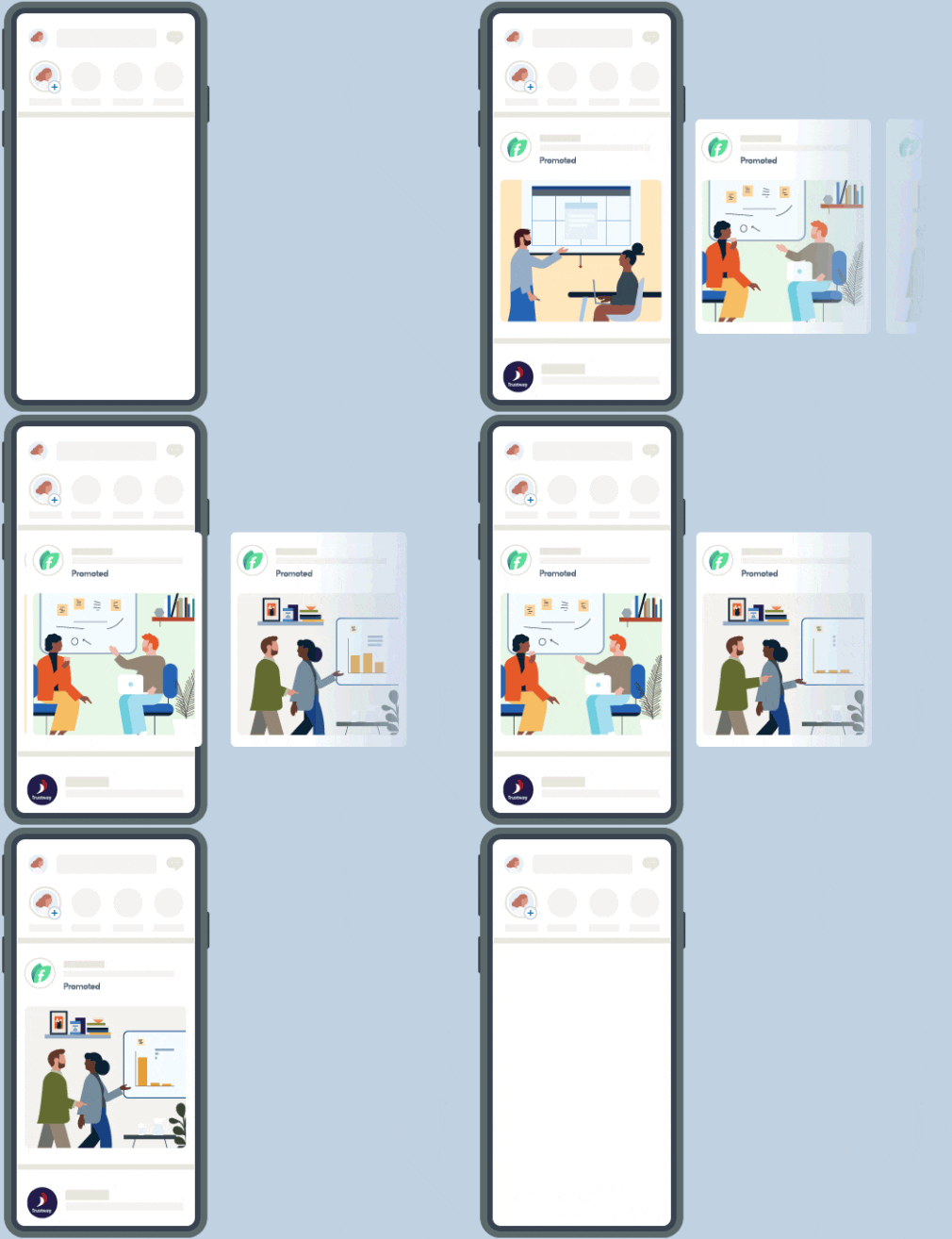
A carousel ad is an interactive ad format that displays multiple cards containing images or videos within a single advertisement. Users swipe sideways on a smartphone or click on arrows on a desktop to navigate through the content.
Each card functions like a small ad of its own. It can feature its own image or video, its own headline, its own description, and its own destination link. This makes it possible to showcase, for example, multiple products, individual features of a product, or the sequential steps of a story—all within a single ad.
If you’re wondering what a carousel post is: The term refers to the same concept in organic (i.e., unpaid) content – such as a carousel post on Instagram. Once you run the format as a paid ad, it’s called a carousel ad.
To help you use this format effectively, it’s worth taking a look at its individual components.
A carousel ad contains at least 2 and usually no more than 10 cards. Each card typically consists of:
Above all the cards, there is also a shared primary text (also known as ad text or intro text) that introduces the entire ad.
When it comes to the question “Carousel Ad – how many images?”, the general rule is: between 2 and 10 cards. As for dimensions, the 1:1 square format (1,080 × 1,080 pixels) has become the go-to standard across platforms because it displays cleanly on both mobile devices and desktops. To maximize space in the mobile feed, many advertisers also use the 4:5 portrait format (1,080 × 1,350 pixels).
All cards should use the same aspect ratio. If you mix formats, the platforms will automatically crop the remaining cards and important image elements may be cut off.
Why should you opt for a carousel instead of a single image? Here are the format’s key advantages:
On Meta, the Carousel Ad is a key format and runs identically across Facebook and Instagram (Feed, Stories), Messenger, and the Audience Network. Key specifications: 2–10 cards, 1:1 or 4:5 aspect ratio, up to 30 MB per image or 4 GB per video.
On LinkedIn, the format is particularly popular in B2B, but has stricter requirements: exclusively 1:1 (1,080 × 1,080 px), JPG or PNG up to 10 MB, 2–10 cards, each card with its own URL. Note: A LinkedIn Carousel Ad cannot be edited once saved.
In e-commerce, you’ll often encounter this format as a Shopping Carousel: The cards are automatically populated from a product catalog and displayed in retargeting campaigns.
Compared to the Single Image Ad (one image, one link), the Carousel Ad offers more interaction and room for storytelling—an A/B test shows which performs better. The difference from the Collection Ad: The latter opens a full-screen experience with a product grid, while the Carousel Ad is swiped through directly in the feed. And unlike the automatically advancing slideshow, the carousel is user-controlled.
Use these best practices to get the most out of the format:
Carousel Ads combine multiple messages, products, or story elements into a single interactive ad. Their strength lies in their storytelling capabilities, higher engagement rates, and the ability to link each card individually—whether on Meta, LinkedIn, or as a Shopping Carousel. With a compelling first card, a consistent design, and the right number of cards, this format becomes a powerful component of your performance marketing strategy.
A carousel ad is an advertisement that combines multiple swipeable cards containing images or videos into a single ad unit. Each card can have its own headline, description, and link.
Typically between 2 and 10 cards. For optimal performance, 3 to 5 cards have often proven to be the best choice.
The Collection Ad opens a full-screen experience with a product grid, while the Carousel Ad can be swiped through directly in the feed.
Seeding is a core component of modern online marketing and is used by many (mostly unconsciously). Here we explain exactly what seeding is and how it affects your own marketing. ... Continue readingSeeding
The Google Knowledge Panel provides quick & easy information about companies and services to users. Learn how to use it right! ... Continue readingGoogle Knowledge Panel
Prompting is a central component of interacting with artificial intelligence and describes the method of entering targeted instructions or questions into an AI system to generate specific, helpful answers or content. Read on to find out what to consider for a good prompt. ... Continue readingPrompt
You want to learn more about exciting topics?
You are currently viewing a placeholder content from Hubspot Embedded Content. To access the actual content, click the button below. Please note that doing so will share data with third-party providers.
More InformationYou are currently viewing a placeholder content from HubSpot. To access the actual content, click the button below. Please note that doing so will share data with third-party providers.
You are currently viewing a placeholder content from Hubspot Meetings. To access the actual content, click the button below. Please note that doing so will share data with third-party providers.
More Information


