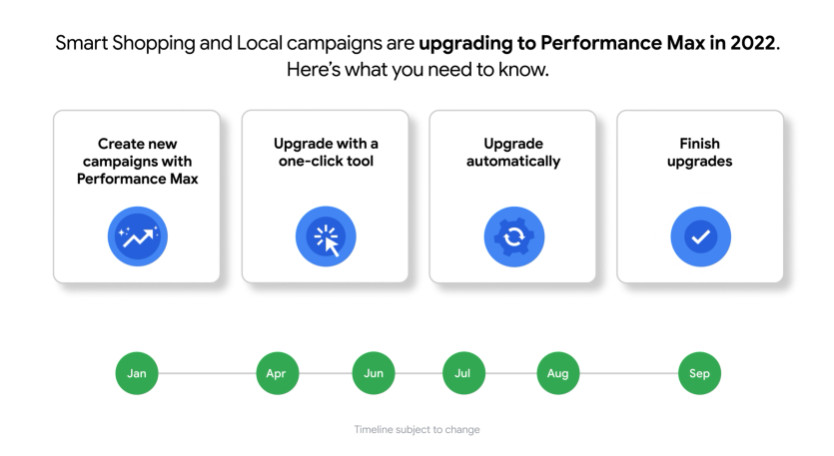
The Performance Max campaign, also known as the PMax campaign, was introduced by Google in July 2021 as a beta version and released to all advertisers in November 2021. Starting in April 2022, it was possible to switch existing “Smart Shopping” campaigns to the new campaign type with just one click, as they were replaced by the Performance Max campaign. Between July and September 2022, all Smart Shopping campaigns were automatically converted to PMax campaigns. Starting in September 2022, Smart Shopping and Local campaigns were completely replaced by the PMax campaign.
Figure 1: Historical smart shopping at PMax
1.2 How do the algorithm and PMax campaign type work?
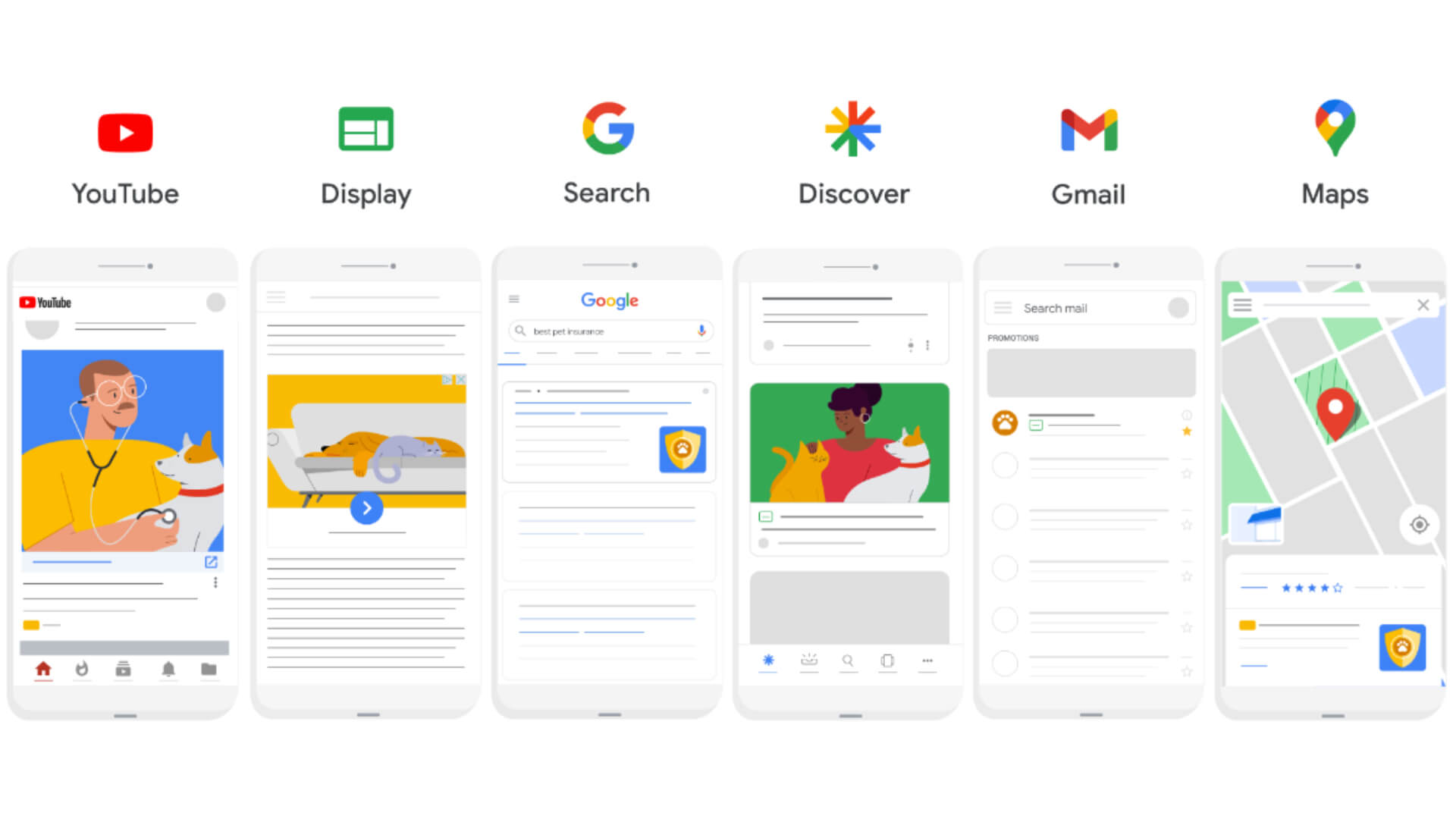
The Performance Max campaign algorithm works on the basis of user signals. It compares user behavior with the creatives provided by the Performance Max campaign. Creatives include text, images, videos, audience signals, and also the optional data feed if the campaign is a shopping campaign. Based on this data and using Smart Bidding, bids are played out across channels in the various networks YouTube, Display, Search, Shopping, Maps, Discover, and Gmail.
The goal of PMax is to increase conversions and conversion values based on preset objectives. Smart Bidding optimizes budgets and bids in real time to achieve the best possible performance.
1.3 Differences between PMax campaigns and Smart Shopping
Google’s new campaign format is largely based on the automatic creation of ads by the algorithm. With this, Google is taking another step away from keyword-based search towards context-based search.
The two campaign types do not differ in terms of their basic functions. When using Performance Max, advertisers have access to additional formats and an expanded inventory that can be used to better target customers.
Performance Max ads are displayed across all Google channels, such as Google Search, Google Shopping, YouTube, the Display Network, Google Discover, Gmail, and Google Maps. In comparison, Smart Shopping only displays ads on the Google Search Network, Display Network, YouTube, and Gmail.
Figure 2: Differences between PMax campaigns and Smart Shopping
The algorithm combines the ad elements provided by advertisers with both potential customers and the respective channel.
Both campaign types use Smart Bidding. While the Smart Shopping campaign relies on the Maximize Conversion Value (Target ROAS) bidding strategy, PMax also offers the option of the Maximize Conversions (Target CPA) bidding strategy.
If the user is currently researching a specific product, it is important to engage them with content marketing or display advertising. In the course of this process, the measures become more targeted. The customer journey is different for every product and user, and different measures are necessary to successfully finalize the process. The Performance Max campaign offers a broad portfolio of text, display, video, and shopping ads through playout in various channels.
Figure 3: Customer journey map
1.4 Availability of PMax (countries)
The Performance Max campaign is available without restriction in all countries where Google Ads is available. Country-specific restrictions for smart campaigns are possible.
As Google expands, its services are becoming available in more and more countries. The following link shows the countries in which Google Shopping is currently available.
1.5 Differentiation from Microsoft
In the field of search engine marketing, the focus is often solely on Google Ads, but Google’s “rival” should not be overlooked. Microsoft Ads has a market share of 5% in Germany, which Microsoft covers with its Bing search engine. Google remains the dominant player in German-speaking countries. A key difference between the two advertising platforms is their availability in different countries. Google Ads is generally available worldwide. Microsoft Ads, on the other hand, is available in significantly fewer countries.
In some areas, Microsoft offers a more attractive approach than Google and has an advantage here. One advantage, for example, is the lower average CPC prices, which are due to low competition. This price development depends on the industry and target group. Bing is the default search engine in browsers, especially on work computers. Bing is therefore often associated with the B2B sector due to its use in companies.
Google users can be reached not only via Google Search, but also via other products and platforms offered by the company, such as YouTube, Gmail, and the Google Display Network.
But Microsoft also has a lot to offer: in addition to Bing, ads are also placed in sub-search engines that use the Bing algorithm. The Microsoft universe includes, for example, Yahoo and the search engine Ecosia, which is of interest to sustainable companies.
Since campaigns from Google are often mirrored or imported to Microsoft and individual adjustments are made to the campaigns afterwards, it is important to check whether all Google campaign types are compatible with the Microsoft platform.
The campaigns can be inserted into Microsoft as Smart Shopping campaigns or Local Inventory Ads. However, certain requirements must be met for import. These depend on the goal of the campaign.
Microsoft distinguishes between Performance Max campaigns for lead generation and e-commerce campaigns with shopping feeds.
1.5.1 Import with Merchant Center
Characteristics
Import mapping for Performance Max and Smart Shopping campaigns
Campaign
Campaign settings are imported unchanged from campaigns for maximum performance into Smart Shopping campaigns, including campaign name, budget, bid strategy to maximize conversion value, location targeting, and merchant store.
Name of the ad group
Asset group names are assigned to ad group names.
However, text and image elements are not imported.
Productgroup
Revenue groups from campaigns for maximum performance will continue to be assigned to product groups in smart shopping campaigns/campaigns with ads for local inventory.
Please note: For all Performance Max shopping import customers, multiple ad groups/product groups can be imported.
Product display
Product ads are generated automatically.
Table 1: Import with Merchant Center
1.5.2 Import ohne Merchant Center
Characteristics
Import campaign assignments for maximum performance in search campaigns
Campaign
Campaign settings are imported unchanged from campaigns for maximum performance in search campaigns, including campaign name, budget, location targeting, and merchant store.
Name of the ad group
Asset group names are assigned to dynamic ad group names. Text, image, and logo assets are imported for automatic ad creation.
Bidding strategy
All bidding strategies are supported, with the exception of “Maximize conversion value”: Import as target ROAS with a default value of 150%.
Table 2: Import without Merchant Center
For detailed and up-to-date requirements, please refer to the official Microsoft website.
2. Creating a Performance Max campaign
2.1 What types of PMax are there?
PMax campaigns can be used across Google’s entire portfolio of channels. Different PMax campaigns are suitable depending on a company’s goals. There are currently four different types of PMax campaigns. The different types and their recommended use are listed in the table below.
Type
Usage
Requirements
Local
For businesses with a local location that want to increase offline sales and store visits
Google My Business listing and corresponding creative assets (images, videos, titles, and descriptions)
Shopping
For online shops that only want to be displayed via shopping ads
For lead generation for companies without an online store
All creative assets (images, videos, titles, and descriptions)
Shopping + Display, Video & Search
For online shops that want to cover the entire marketing funnel
Shopping feed and all creative assets (images, videos, titles, and descriptions)
Table 3: Types of PMax
2.1.1 Requirements
Depending on the campaign’s objective, different requirements must be taken into account. The Performance Max campaign is suitable for lead generation and e-commerce.
A basic requirement is functioning tracking, regardless of the campaign’s goal, as it is essential for the campaign’s success. The possible bidding strategies are limited to performance-oriented options: Maximize conversions (with optional target CPA) and maximize conversion value (with optional ROAS). Therefore, another requirement is openness to the use of smart bidding strategies.
Depending on the type of Performance Max campaign used, a Google Merchant account with a connected shopping feed, a Google My Business listing, and creative assets (images, videos, titles, and descriptions) are required.
2.3 PMax structure
To exploit the full potential of PMax campaigns, the following campaign structure is recommended. These structural recommendations refer specifically to two different levels. You can distinguish between the campaign level and the asset group level or entry group level. The bidding strategy and budget are stored at the campaign level, so the campaign should be structured according to these criteria. In other words, a structure based on business goals is recommended at the campaign level. At the second level, the asset group level, the campaign should then be divided according to product categories. The following table illustrates a recommended campaign structure for an online shop.
Campaign
Bidding strategy
Result
Note
High-margin products
Low target ROAS
Aggressive bidding behavior for the most profitable products in the shop.
A low ROAS is used as a target here, as the products inherently have a good margin.
Low-margin products
High target ROAS
Restrained bidding behavior for products with low margins.
Due to the low margin, not all auctions should be contested.
Sale products
Maximize conversion value
Selling as many sale items as possible
Well suited for selling as many sale items as possible. If you want to achieve high profits at the same time, a high target ROAS is recommended.
Table 4: PMax structure
The settings options for a Performance Max campaign are more limited than for conventional campaigns. Therefore, the campaign structure is the most important lever for campaign management. Once the campaign structure has been defined, the asset groups are divided up. In most cases, it is advisable to divide them according to product categories. In the case of an online fashion store, these would be jackets, pants, shoes, etc., for example. How detailed this division is depends on the breadth of the product range. Usually, three to eight asset groups are sufficient. These are then assigned entry groups and filled with creatives, titles, and descriptions.
2.3.1 Product feed
How you can divide asset groups often depends on which attributes are to be included in the product feed. It is difficult to classify asset groups according to product categories, for example, if these are not included in the feed. The same applies to classification by margin: whether a product falls into the high or low margin category can be specified in the product feed as a user-defined field so that it can then be classified.
Consequently, the product feed is another important lever for campaign management in Performance Max campaigns. The so-called product data specifications, which are summarized in a product feed, are divided into:
Required attributes
Required or optimal attributes depending on the country or product
Optional attributes
If the required attributes are not listed, the stored products will not appear in Shopping ads and free listings. Therefore, the required attributes should always be listed. The most important required attributes include, for example: ID, title, description, link, image link, availability, availability date, and price.
2.3.2 Asset group
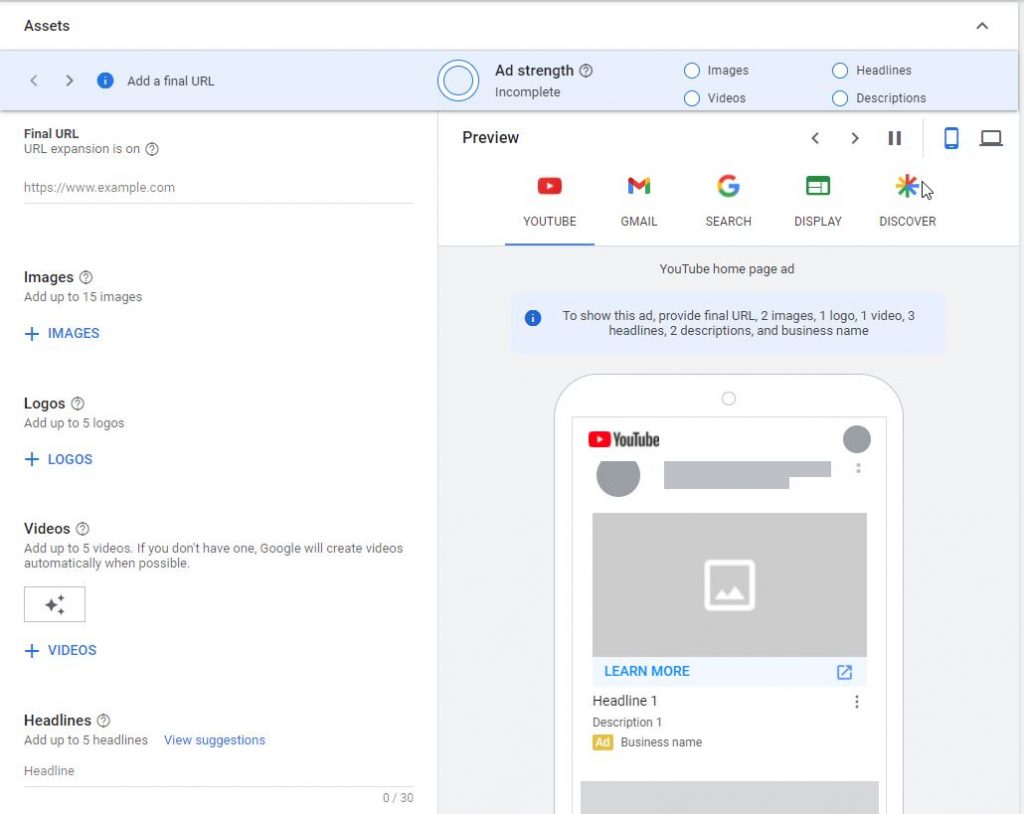
As already mentioned, creatives are stored at asset group level. The following assets can be used:
Final URL
Up to five titles (30 characters)
Up to five long titles (90 characters)
Up to four descriptions (30–90 characters)
Company name
A call to action
Up to two display URLs
Up to 15 images
Logo
Up to five YouTube videos (>10s)
Figure 4: Asset group settings
The creatives are then played out in all possible combinations. It is therefore important to ensure that creatives and texts work well together. Through machine learning, performance campaigns quickly learn which creatives perform best. YouTube videos can also be stored optimally. However, if none are stored, Google Ads generates an automated video from the stored images and texts. Even with high-quality images, this often looks unprofessional compared to videos produced specifically for this purpose and should be avoided.
2.3.3 Audience signals
Audience signals are information used to optimize ad placement and delivery to potential customers. These signals include data such as demographic characteristics, interests, device information, and past user behavior. By analyzing these signals, the Performance Max campaign can create more relevant ads for the target audience and achieve more targeted placements to increase the likelihood of conversion. Google’s best practice recommendation is to use custom segments and leverage your own data.
2.4 Procedure Launching PMax campaigns
2.4.1 Checklist for launching a Performance Max campaign
What type of PMax campaign is right for you?
Are the requirements met?
Product feed (in the case of an online store)
Conversion tracking
How should the PMax be structured?
Choice of bidding strategies and budget based on the campaign structure
Selection of high-quality creatives
Storage of final URL, titles, and descriptions
2.4.2 PMax learning phase
Once the campaign has been launched, it goes through a learning phase that can last between four and eight weeks. During this time, nothing should be changed in terms of the budget, bidding strategy, or assets.
The target group signals stored for all asset groups should be used to accelerate the learning phase. If Performance Max finds signals during playback that better meet the stored target, the manually stored signals are ignored. Google does not specifically communicate how strongly the signals are taken into account, but they can accelerate the learning phase and can be helpful, especially with a small budget.
3. Analyze Performance Max campaigns
The analysis of Performance Max campaigns has been and continues to be criticized because the control and playout are not transparent and therefore difficult to understand. Since the introduction of Performance Max campaigns, Google has provided individual options and insights for interpreting PMax campaigns.
3.1 Performance Max statistics
Under Statistics, you will find an overview of insights into the campaign, but this is very limited. The performance of the campaign can be better evaluated using the values in the campaign overview, as there are significantly more KPIs and columns available here.
You will also find a report on search terms here. This provides information about which search queries triggered the campaign. The search terms are categorized and not listed individually as is the case with search campaigns. The report can be used to check whether the campaign is performing correctly and reaching the desired target group. This report is therefore purely a control tool.
The Target Group Information section provides an overview of which target groups interact most with the ads. Based on these statistics, you will receive information about the targeting of the campaign and whether the Performance Max campaign is reaching the right users.
If the campaign has been running for at least 30 days, you can access the general trends of the campaign. This card provides short-term developments that you can use to improve the performance of the campaign or counteract events.
The signals used to adjust bids within the PMax campaign are also displayed. Here you can check the extent to which these match your own assessment of important target group signals. It is important that these signals are carefully monitored and adjusted if necessary to ensure that bids are based only on relevant signals.
3.1.1 Auction data
In the Auction Data tab, you can see which competitors overlap with your product portfolio. This competitor report can be used for analysis to identify changes in the market and to get an overview of market shares. You can also use the competitors to determine whether the campaign is performing correctly. If well-known competitors are in the auction data, this confirms that the campaign is running correctly.
3.1.2 Products
If the campaign uses a product data feed, you can view the performance of the various products under the Products tab. The Diagnosis subcategory provides a quick overview. Here you can see at a glance which products have been provided and which are restricted. For an individual evaluation of the products, click on the entry group to see the performance of the products.
3.1.3 Keywords to exclude
The best way to maintain control over Google Ads campaigns is to add negative keywords.
There are two ways to assign negatives to campaigns:
1. Keyword exclusion lists at account level
2. Google Ads Support: Either create your own exclusion list in your account or have it added by Support. In both cases, you can then tell Support which campaigns this should be applied to. Once you have given Support permission to make changes to your account, these will be applied to the desired campaigns. After that, the lists can be changed at any time independently of support.
3.1.4 Placement optimization
The PMax Placement Report in Google Ads can be used to determine where the campaign was played. This report provides some transparency to assess whether the pages are relevant to the campaign or not.
The report can be found under:
Reports/Predefined Reports (Dimensions)/Other/Placement of the Performance Max Campaign
However, only the placement and the associated impressions can be viewed, but not other performance KPIs.
3.1.3 Optimization options in the account/campaign
Even though Google does not provide much insight into how it works, there are some optimization options to improve campaign performance.
One of the biggest levers is the campaign structure. Before creating campaigns, you need to carefully consider what goals you want to achieve. Depending on the goal, the assets must be adjusted accordingly. Campaign structure optimization can be done at the campaign level, asset group, or entry group.
Campaign level:
Are multiple campaigns needed, or is one campaign sufficient to pursue the goals? It is generally recommended to provide the campaigns with as much information as possible and thus keep the campaign structure as simple as possible. The more data available, the faster the campaign learns and delivers better results. It makes sense to create multiple campaigns in the following cases:
Geographic targeting
Different daily budgets for campaigns (services, products, etc.)
Different CPA target values or bidding strategies
Different campaign goals
Asset group:
Plan your asset groups and segment them if possible. Products that belong to the same product family can easily be divided into subcategories, for example. For example, you can divide cars into different brands or pants into different subcategories such as jeans, leggings, chinos, etc. The advantage of this division is that you can assign suitable ad assets and target groups to the individual asset groups.
Entry groups:
Optimize entry groups by assigning them to individual campaigns and ad groups. Entry groups should be created based on the product ID level. The advantage of this is that products can be included and excluded in a more targeted manner. In some cases, depending on the campaign objective, it also makes sense to work with custom labels in the data feed in order to be able to display the products in an even more targeted manner.
4. Recommendations
4.1 PMax advantages and disadvantages
4.1.1 Advantages
True to the motto “Google will take care of it,” PMax works virtually on its own, offering you a clear advantage in terms of time savings. There is no need for manual maintenance of keywords, etc. In addition, PMax itself tests the stored creatives against each other, thus continuously optimizing placements and creatives. Another advantage is the enlarged target group. Conventional campaigns cannot reach the same number of potential customers. One of the main reasons for this advantage is the full funnel approach of PMax campaigns, which enables playback in different networks of the Google universe. Furthermore, the smart bidding strategies of a PMax can develop to their full potential thanks to full automation.
4.1.2 Disadvantages
The biggest advantage, full automation, is probably also the biggest disadvantage. This is because a PMax offers very few customization options. There is little control over how creatives are played together. Therefore, careful consideration must be given in advance to whether assets can be combined well with each other.
If no video is stored, Google Ads will compile one itself from the stored assets. The result of these automatically generated videos is often of poor quality and does not look professional.
The evaluation options of a PMax are still very limited. This makes it difficult to understand why PMax is performing well or poorly. To be fair, it must be said that the evaluation options have already improved somewhat compared to September 2022. With a few tricks, the most important information can be found out. Since the optimization options in the control are limited, the additional insights lose their significance because it is difficult to actively influence the performance of a PMax campaign.
4.2 The full funnel approach to PMax campaigns
The Performance Max campaign is a fully automated campaign type from Google Ads. A PMax can be played out across the entire Google network. PMax thus covers the entire marketing funnel in the Google network, meaning that the customer journey is only covered in the Google network. With a market share of 88% in desktop and 96% in mobile (as of May 2023) search engine market, Google is naturally the most important advertising platform for a large number of companies.
In addition to the Google search engine, there is also YouTube, a video platform with a very large user base of 2.56 billion monthly users. In Germany, 85.1% of the population is active on YouTube. Google Maps is used by 1 billion people every month, making it a very powerful tool. The Google Display Network can reach 90% of internet users worldwide on millions of websites, news sites, blogs, and Google products such as Gmail and YouTube.
While the full funnel strategy is a proven method for accompanying users along their journey, you mustn’t forget that they are on different platforms. With the full funnel approach of a PMax, for example, platforms such as Instagram (1.48 billion users worldwide), TikTok (1 billion users worldwide), and others are not used.
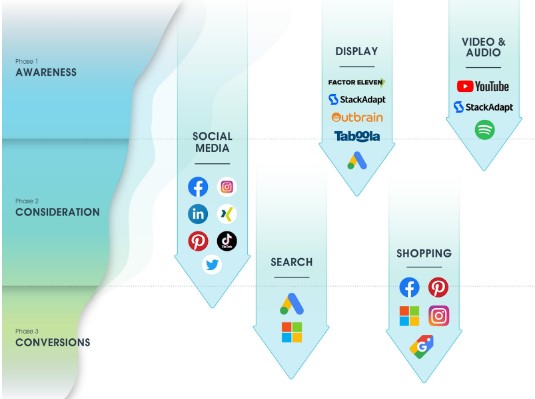
Figure 5: eology marketing funnel
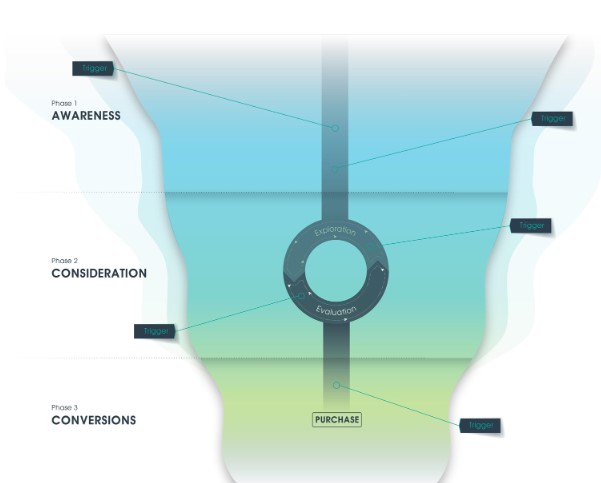
The marketing funnel shown clearly illustrates that PMax can cover almost the entire funnel. However, the second phase (consideration) in the customer journey is best achieved with social networks such as Facebook, Instagram, and the like.
Most consumers no longer move linearly through the funnel; rather, they spend a lot of time in the exploration and evaluation phase before making a purchase decision in the final phase, conversion. This exploration and evaluation takes place in the consideration phase. Since this phase is best covered by traditional social networks, it becomes clear once again that filling the marketing funnel with PMax campaigns alone is not sufficient.
Figure 6: eology marketing funnel phases
Even though the consideration phase can be better covered by other platforms, the PMax campaign, with placements across the entire Google network, remains an attractive and simple solution for holistically targeting the marketing funnel. It is important to mention here that it is currently still difficult to influence placements in the different phases. The question of whether PMax is an efficient full funnel campaign must therefore be answered with “yes and no”.
4.2.1 Alternative channels
Performance Max campaigns have the clear advantage over many alternatives in that they cover the entire marketing funnel. However, this does not mean that this is the only option available if you want to cover the entire funnel.
In addition to Google Ads inventory, which can cover the entire Google network in a PMax campaign, numerous other media can cover the different phases of awareness, consideration, and conversion during the customer journey.
The following table shows possible alternatives to Google Ads inventory for a Performance Max campaign.
Google Ads inventory
Alternative placement
Search Network and Search Network Partners (including Shopping)
Amazon, Social Media
Displaynetwork
Alternative display providers such as FactorEleven, StackAdapt, Outbrain, Taboola
Gmail
Other email portals via display providers such as FactorEleven, StackAdapt, Outbrain, Taboola, and Microsoft
YouTube
Instagram & Tiktok
Google Discovery
Instagram Explore Page, TikTok For you page
Table 5: Alternatives
Like Performance Max campaigns, social media ads can cover the entire marketing funnel. No matter what stage a customer is at, they can be reached via social media. The trick is to show users the right thing at the right time. Most providers offer advertisers the option of choosing between different campaign types that support either the awareness, consideration, or conversion phase. This makes social media particularly attractive for e-commerce companies, because shopping can take place directly on the platform.
Alternative display providers enable placements on different sites that can cover similar areas to the Google network.
Using alternative channels to PMax campaigns offers advantages in the form of risk outsourcing, differentiation, and, depending on the channel, better evaluation options and influence. However, the full marketing approach also requires competent support from an agency or a specialized in-house team that keeps track of all channels.
4.3 How well does the PMax campaign work?
There is no simple answer to the question of whether PMax works or not. To assess this, criteria must be established to determine how this is measured. It is also important to be clear about what is expected from this type of campaign before launching a PMax campaign. If the expectation is that this campaign will perform at least as well as previous Smart Shopping campaigns, you will probably not be disappointed. The only question is how it works. And what options are available if the campaign does not perform well, or what can be done to make the campaign perform even better?
To answer this question, a comprehensive analysis should be carried out. In addition to the analysis options in the live Google Ads account, you should also consult additional analyses: Implementing scripts and evaluating brand and non-brand traffic are two additional evaluation options that should definitely be used.
Checklist for whether PMax campaigns are working:
No or hardly any brand traffic (if there is a lot of brand traffic, exclude brand terms).
No significant slump in the other campaigns in the account.
Placements in different locations correspond to expectations (e.g., online shops with a stored feed should receive the majority of placements in the shopping area).
Uniform display of products (keyword: bestseller trend)
Search terms and target groups match the products or services of the campaign
4.3.1 Brand displays
Especially at the beginning of Performance Max campaigns, many advertisers had the problem of embellished performance figures due to campaign displays for brand keywords. Whether the Performance Max campaign is displayed for these should be checked regularly or excluded from the outset.
4.3.2 Bestseller trend
Companies that have stored a shopping feed in PMax campaigns often experience the problem of the “bestseller trend.” Here, products that sell well are primarily displayed. Other products, on the other hand, receive hardly any impressions. This is a very similar issue to the one discussed in the section on the recommended campaign structure.
Performance Max campaigns, as the name suggests, are designed for maximum performance. This means that if the target ROAS can best be achieved with a handful of products, which is often the case with best-selling products, other products are neglected. However, this can be a problem if something goes wrong with the bestsellers, e.g., they drop out of the feed for technical reasons, are sold out, or are removed from the range. In this case, Google would have little or no experience with the other products, as they were not displayed.
To find out whether your own PMax campaigns are affected by the bestseller trend, you can run a “low volume script.” In this script, you can then see what percentage of products has received hardly any impressions. To generate impressions for these products, they must be entered into a self-filling sheet, which is then used as a subfeed, and marked as low volume products. This label can then be used to select the products in your Google Ads account. The goal should be to cover the entire store in Shopping. This way, you can collect enough data to prepare yourself for unforeseen events or changes in the feed.
4.3.3 PMax scripts
To analyze PMax campaigns, additional scripts should be used, in which you can then read out the playback of the campaigns on the various Google network platforms (Shopping, Search, Display & Video). If unfavorable playbacks that do not support the campaign goals become apparent, you should go through the various optimization options.
Well-known and helpful scripts include the Low Volume SKUs script from Google and the PMax Charts from Agencysavvy. Scripts can be added via Tools and Settings under the Scripts item. Then click on the plus sign and the new script can be created. Once the script has been successfully stored, you can set how often the script should be executed.
4.3.4 Invalid clicks
An evaluation of invalid clicks should also be carried out regularly, as these can also indicate unwanted playback.
The use of tools can prevent click fraud. It is important to distinguish between invalid clicks and click fraud. If Google detects click fraud, these clicks will not be billed. A high number of invalid clicks can indicate a high proportion of display playback. In this case, you should refer to the evaluation of scripts.
5. Conclusion
The success of a Performance Max campaign depends on various factors. On the one hand, the structure of the campaign and the targeting are of crucial importance. Positive results can be achieved through careful planning and targeting of the audience.
Another aspect is the availability and quality of inventory in the various networks. If there are enough high-quality placements available for ad delivery, the likelihood of a successful Performance Max campaign increases.
In addition, the bidding strategies used and budget management also play an important role. Choosing the right bidding strategy and allocating the budget correctly are crucial to achieving the desired results.
However, it should be noted that the Performance Max campaign is still relatively new and constantly evolving. A certain learning phase may be necessary, during which the algorithm collects and optimizes data to achieve the best possible results.
Overall, it can be said that Performance Max campaigns can deliver good results with proper planning, targeting, and continuous optimization. However, it is important to monitor performance regularly, analyze the data, and make adjustments as necessary to realize the full potential of the campaign.
Author
Franziska HerbertPaid Advertising Expert
Franziska Herbert is Team Lead Performance Marketing at eology GmbH. She has more than nine years of experience in online marketing and has acquired extensive expertise during this time. Her focus is on strategic consulting for clients, particularly in the area of Google Ads. In this role, she is responsible for the design and implementation of high-performance digital marketing strategies.
Social commerce enables brands to sell their products directly via platforms such as Instagram, Facebook, and TikTok. Discover how these trends are changing consumer behavior and what opportunities they present for your business! ... Continue readingSocial commerce – selling right in the middle of the feed
You are currently viewing a placeholder content from Hubspot Embedded Content. To access the actual content, click the button below. Please note that doing so will share data with third-party providers.
You are currently viewing a placeholder content from HubSpot. To access the actual content, click the button below. Please note that doing so will share data with third-party providers.
You are currently viewing a placeholder content from Hubspot Meetings. To access the actual content, click the button below. Please note that doing so will share data with third-party providers.